
Saturday, September 17, 2011

Thursday, September 15, 2011

Wednesday, September 14, 2011

How To Install Windows 8 From USB Key
Microsoft has just released a developer preview of their upcoming operating system Windows 8. Users from all over the world can download the preview and install it on their systems. There is only one restriction with regards to the installation: You cannot update an existing copy of Windows, the Windows 8 installation requires a clean install.
I thought it would be perfect for my Acer notebook. It is fairly underpowered by today’s standards, and does not come with a DVD drive which I could use otherwise to install Windows 8.
The only viable option in this case is to install from USB keys, sticks or drives. Installation is a little bit difficulty, as it requires more preparation than just burning an ISO image to disk and putting that ISO into the DVD drive of the computer.
You need an USB key with at least four Gigabytes of free space. The first step is to format the key with the FAT32 file system. This is done by connecting the USB key to the computer, right-clicking its drive letter and selecting Format from the options. The Format window pops up where you need to make sure that Fat32 is the selected file system. Everything else can be left as is.
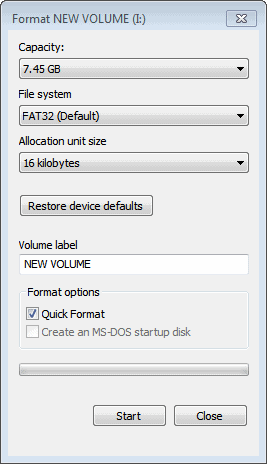
Wait until the formatting has finished. You now need access to the Windows 8 ISO or DVD. The developer preview is only provided as an ISO image. Check out Windows 8 Download for instructions or download the developer preview right here.
more @ Martin Brinkmann post..
Tuesday, September 13, 2011
Use a USB Thumb drive to Install Windows 7 or Windows 8
- Download diskpart installer from Microsoft site. Install it.
- Open command prompt as Administrator and type diskpart.
- Enter list disk and you will see all connected disks and numbers.
- Enter select disk X (X being the number of the USB Thumb drive).
- Enter clean Note: Make sure you don't have any files in the USB thumb drive.
- Enter create partition primary
- Enter select partition 1
- Enter active
- Enter format fs=fat32
- Enter assign
- Enter exit
- Extract the iso downloaded from my previous post and copy files from the iso image to the usb and boot your pc with USB Thumb drive.
Enjoy installing and using Windows 8 !!!
Download the Windows 8 Developer Preview now
Download the Windows 8 Developer Preview now
The Windows Developer Preview is a pre-beta version of Windows 8 for developers. These downloads include prerelease software that may change without notice. The software is provided as is, and you bear the risk of using it. It may not be stable, operate correctly or work the way the final version of the software will. It should not be used in a production environment. The features and functionality in the prerelease software may not appear in the final version. Some product features and functionality may require advanced or additional hardware, or installation of other software.Windows Developer Preview with developer tools English, 64-bit (x64)
DOWNLOAD (4.8 GB)Sha 1 hash - 6FE9352FB59F6D0789AF35D1001BD4E4E81E42AF
All of the following come on a disk image file (.iso). See below for installation instructions.
- 64-bit Windows Developer Preview
- Windows SDK for Metro style apps
- Microsoft Visual Studio 11 Express for Windows Developer Preview
- Microsoft Expression Blend 5 Developer Preview
- 28 Metro style apps including the BUILD Conference app
Windows Developer Preview English, 64-bit (x64)
DOWNLOAD (3.6 GB)Sha 1 hash – 79DBF235FD49F5C1C8F8C04E24BDE6E1D04DA1E9
Includes a disk image file (.iso) to install the Windows Developer Preview and Metro style apps on a 64-bit PC.
Windows Developer Preview English, 32-bit (x86)
DOWNLOAD (2.8 GB)Sha 1 hash - 4E0698BBABE01ED27582C9FC16AD21C4422913CC
Includes a disk image file (.iso) to install the Windows Developer Preview and Metro style apps on a 32-bit PC.
Subscribe to:
Posts (Atom)